Run Python Scripts
Use Python and its third-party libraries for data processing, scientific computing, and text analysis.
Feature Overview
Python scripts can:
- Use Python to process text
- Use third-party Python libraries
Runtime Environment
TextGO uses the executable configured under "Python Path" in "Script Execution Options" when provided. Otherwise, it tries python3 and then python, using the system PATH plus common installation locations.
Supported Python Versions:
- Python 3.9+
Packages imported by a script must be installed in the Python environment selected by TextGO.
Create a Python Script
Step 1: Access Script Management
- Open "Settings" > "Script Execution"
- Click the "+" button to open the "New Script" dialog
Step 2: Basic Information
Action Name (Required)
- Identifies the script
- Use a descriptive name
Action Icon (Optional)
- Click the current action icon to open the icon selector
- Select from "Built-in Icons" or use "Upload Custom SVG"
Script Type (Required)
- Select Python
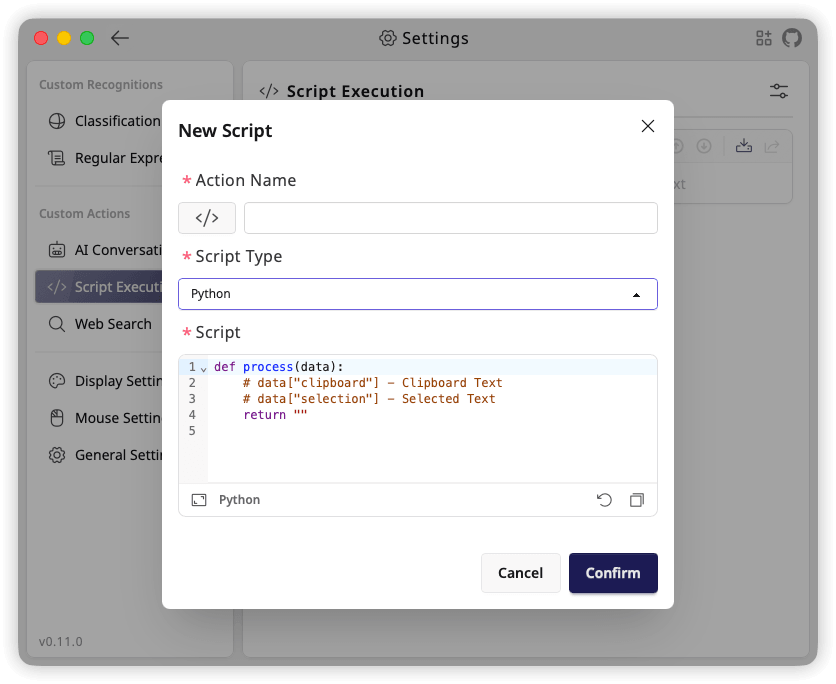
Step 3: Write Your Script
Script (Required)
Python scripts must include a process function:
python
def process(data):
    # data["clipboard"] - Clipboard content
    # data["selection"] - Selected text
    # data["datetime"] - Execution time in ISO 8601 format

    # Return processed text
    return ""
Parameters:
data: Input dictionarydata["clipboard"]: Current clipboard text contentdata["selection"]: Selected text contentdata["datetime"]: Execution time in ISO 8601 format
Return value:
- Strings are returned directly; other serializable values are converted to JSON
- Can return an empty string
- Leading and trailing spaces and newlines in strings are preserved;
print()is for debugging and does not become the return value
Use a Python Script
After creating a script, add it to a shortcut rule:
- Open "Global Shortcuts"
- Add a new rule
- Select the Python script in "Execute Action"
- Save the rule
Python Script Examples
Example 1: Word Count
python
def process(data):
    return len(data["selection"].split())
Example 2: Sort Lines
python
def process(data):
    lines = data["selection"].split("\n")
    sorted_lines = sorted(lines)
    return "\n".join(sorted_lines)
Example 3: Remove Empty Lines
python
def process(data):
    lines = data["selection"].split("\n")
    non_empty = [line for line in lines if line.strip()]
    return "\n".join(non_empty)