Write Regular Expressions
TextGO can use regular expressions to match text with a clear structure or pattern.
What Is a Regular Expression?
A regular expression describes a text pattern with a compact, specialized syntax.
When to Use Regular Expressions
Suitable Scenarios for Regular Expressions
✅ Clearly Structured Text
- Phone numbers, ID numbers, and postal codes
- Specific format codes or numbers
- Fixed-format dates and times
✅ Deterministic Matching
- Strictly defined business formats
- Input that requires exact validation
✅ Simple and Clear Patterns
- Patterns that simple rules can describe
- Limited, predictable variations
Unsuitable Scenarios for Regular Expressions
❌ Fuzzy or Complex Patterns
- Requires contextual understanding
- Has too many variations to enumerate
❌ Patterns That Need Learning
- No clear fixed rules
- Characteristics must be learned from samples
Create a Regular Expression
Step 1: Access Regex Management
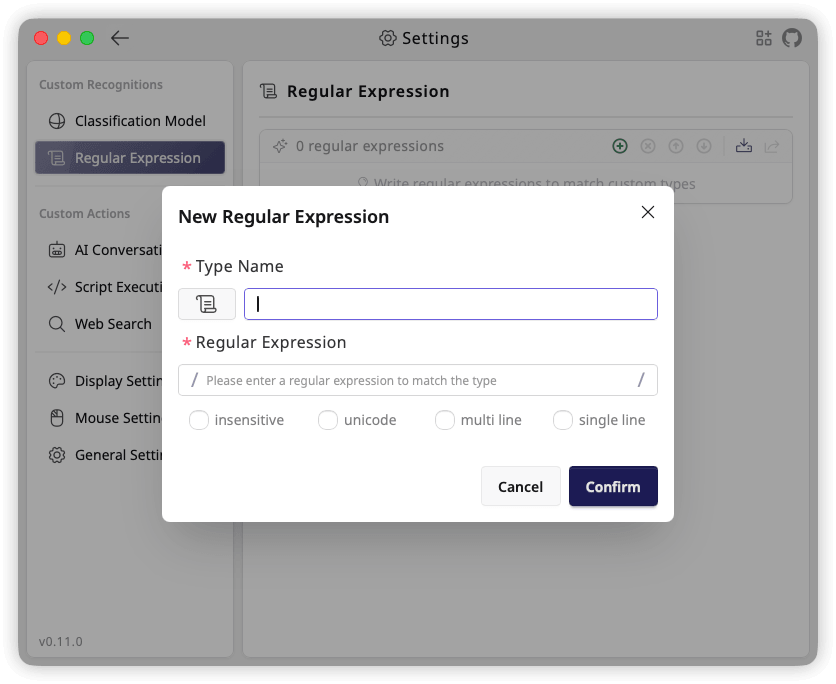
- Open "Settings" > "Regular Expression"
- Click the "+" button to add a new regex
Step 2: Basic Information
Type Name (Required)
- Identifies the regular expression
- Use a descriptive name
Type Icon (Optional)
- Click the current type icon to open the icon selector
- Select from "Built-in Icons" or use "Upload Custom SVG"
Step 3: Write Regular Expression
Regular Expression (Required)
- Enter a regular expression to match the type
Match Options (Optional)
i(insensitive): Case-insensitive matchingu(unicode): Enable Unicode-aware matchingm(multiline):^and$match at line boundariess(single line): Dot matches line terminators
TextGO uses JavaScript regular expression semantics. A type matches when the pattern matches any part of the selected text. Add ^ and $ when the entire selection must match.
Use a Regular Expression
Saved regular expressions appear in the recognition type list:
- Open "Global Shortcuts"
- Add a new rule
- Select the saved regular expression in "Recognize Type"
- Configure an action and save
Regular Expression Syntax
Basic Syntax
Character Matching
| Syntax | Description | Example |
|---|---|---|
. | Match any single character | a.c matches abc, a1c |
\d | Match a digit (0-9) | \d{3} matches 123 |
\D | Match a non-digit | \D+ matches abc |
\w | Match a word character | \w+ matches hello_123 |
\W | Match a non-word character | \W+ matches @#$ |
\s | Match whitespace | \s+ matches space, tab |
\S | Match non-whitespace | \S+ matches hello |
[abc] | Match a, b, or c | [0-9] matches any digit |
[^abc] | Match anything except a, b, or c | [^0-9] matches non-digit |
Quantifiers
| Syntax | Description | Example |
|---|---|---|
* | 0 or more times | ab* matches a, ab, abb |
+ | 1 or more times | ab+ matches ab, abb |
? | 0 or 1 time | ab? matches a, ab |
{n} | Exactly n times | a{3} matches aaa |
{n,} | At least n times | a{2,} matches aa, aaa |
{n,m} | n to m times | a{2,4} matches aa, aaa, aaaa |
Position Matching
| Syntax | Description | Example |
|---|---|---|
^ | Start of string | ^hello matches hello at the start |
$ | End of string | world$ matches world at the end |
\b | Word boundary | \bword\b matches the whole word |
\B | Non-word boundary | \Bword matches without a leading word boundary |
Grouping and Alternation
| Syntax | Description | Example |
|---|---|---|
(abc) | Group | (ab)+ matches ab, abab |
a|b | a or b | cat|dog matches cat or dog |
(?:abc) | Non-capturing group | (?:ab)+ matches without capturing |
Escape Characters
| Syntax | Description |
|---|---|
\. | Literal dot |
\* | Literal asterisk |
\\ | Literal backslash |
\[ | Literal left bracket |
\( | Literal left paren |