Call an LLM API
TextGO connects to local and cloud AI models for translation, rewriting, summarization, Q&A, and other text-processing tasks.
Feature Overview
Prompt templates can:
- Use local or cloud AI models to process text
- Create custom prompt templates
- Switch source and target languages in Translation Mode
- View streamed responses, continue the conversation, and copy or insert answers in the popup
Supported model providers:
Local:
Cloud:
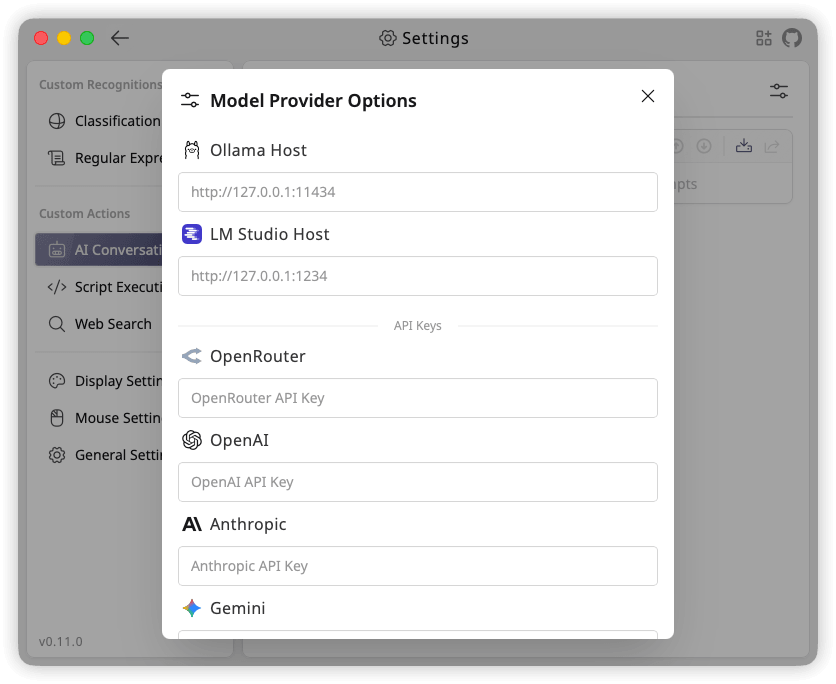
Under "Custom Providers", enter "Name", "Base URL", and "API Key" to add an OpenAI-compatible provider.
Open "Model Provider Options" from the "AI Conversation" page to configure local service addresses, cloud API keys, and custom providers:
Create a Prompt Template
Step 1: Access AI Conversation Configuration
- Open "Settings" > "AI Conversation"
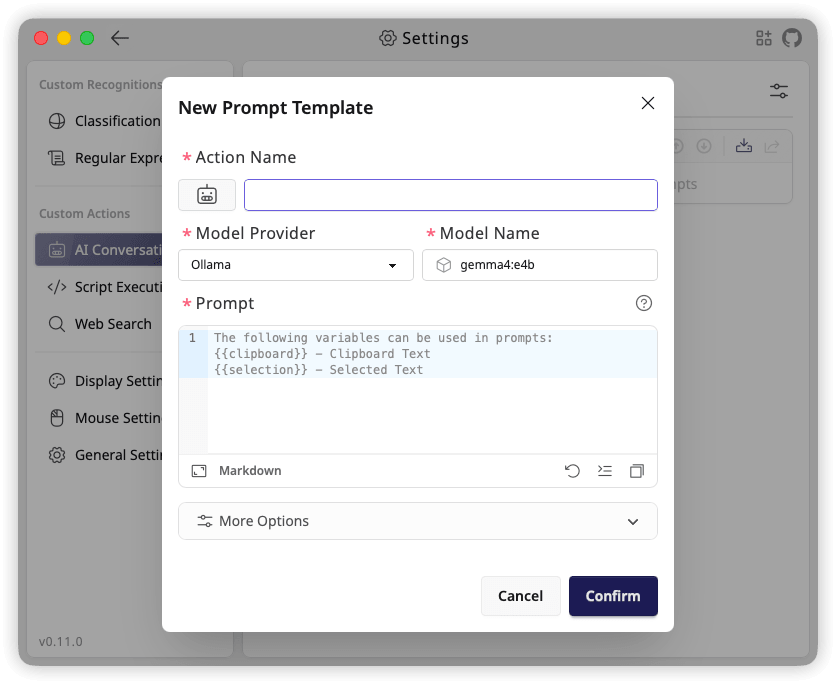
- Click the "+" button to open the "New Prompt Template" dialog
Step 2: Basic Information
Action Name (Required)
- Identifies the prompt template
- Use a descriptive name
Action Icon (Optional)
- Click the current action icon to open the icon selector
- Select from "Built-in Icons" or use "Upload Custom SVG"
Model Provider (Required)
- Select a local, cloud, or custom model provider
- Configure an API key under "Model Provider Options" before selecting a cloud provider
Model Name (Required)
- Enter the model name used by the provider
Step 3: Create a Prompt Template
Prompt (Required)
The prompt determines how AI processes your text.
Variables:
- {{selection}}: Selected text
- {{clipboard}}: Clipboard content
- {{datetime}}: Execution time in ISO 8601 format
These variables also work in the system prompt.
More Options (Optional):
- System Prompt: Defines the AI's role and behavior
- Max Tokens: The maximum number of tokens that can be used in the generated response
- Temperature: Controls the randomness of generated text; higher values produce more random output
- Top-P: Controls the diversity of the generated text by nucleus sampling
- Custom JSON Parameters: A valid JSON object merged into the model request body, overriding matching form parameters
Available custom fields depend on the provider and model. For example, this configuration overrides the temperature and requests a non-streaming response:
{
  "temperature": 0.3,
  "stream": false
}
Leave this field empty or enter {} to add no custom parameters. Arrays, null, and invalid JSON cannot be saved.
Translation Mode
Enable "Translation Mode" in the prompt editor and select a target language. This adds source text and language controls to the popup; your prompt still defines the translation instructions.
When enabled, the prompt and system prompt can also use:
- {{sourceLanguage}}: The detected or manually selected source language, such as
English (en) - {{targetLanguage}}: The selected target language, such as
Chinese (zh)
Example prompt:
Translate the following text from {{sourceLanguage}} to {{targetLanguage}}.
Return only the translation:

{{selection}}
The source language is detected locally by default and can be selected manually in the popup. Editing the source text and moving focus away, or changing a language, regenerates the translation. Once a source language is selected explicitly, you can also swap the source and target languages. The dropdowns offer the same 10 languages as natural-language recognition rules.
Use a Prompt Template
After creating a prompt template, add it to a shortcut rule:
- Open "Global Shortcuts"
- Add a new rule
- Select the prompt template in "Execute Action"
- Save the rule
Prompt templates always open the result in a popup, where the conversation can continue.
AI Conversations in the Popup
- Stop Generating: Cancels the current response
- Regenerate: Requests the current answer again after generation finishes
- Continue the conversation: Click the conversation button in the lower right corner, enter a follow-up, and send it; further messages use the composer at the bottom
- Copy / Insert: Hover over a completed answer to show its action buttons. Copy the answer's raw text, or insert it into the source app to replace the selection. Inserted text stays on the clipboard
- Thinking process: When the model returns readable thinking content, an expandable section shows it separately from the answer. Copy and Insert use only the answer
Responses appear progressively by default. With "stream": false, they appear when the request finishes. The thinking section depends on what the model and provider actually return.